A practical decision guide for finance and compliance teams choosing delta-capable enterprise report management systems — before the wrong vendor costs you six months and seven figures.
✓ Written by IFRS TECH’s advisory team · ✓ Serving GCC, Europe & APAC · ✓ Actuaries + CPAs + CFAs
TL;DR
Choosing the right enterprise reporting solutions provider is a decision that locks your finance team into a workflow for years. This guide covers what delta features actually mean in enterprise report management systems, how to build a vendor scorecard, and which red flags to spot before you sign. You’ll also get a six-step decision framework for delta software solutions, criteria specific to insurance delta reporting, and a clear checklist for provider evaluations. Use it before your next demo call.
Why Most Enterprise Reporting Solutions Selections Go Wrong
Here’s a number worth sitting with: 73% of enterprise software implementations fail to meet their stated objectives. Not partially. Fail. And vendor selection errors account for 19% of those failures specifically.
That’s not a planning problem. That’s a selection problem.
Most teams walk into vendor demos already anchored to a shortlist assembled from a colleague’s recommendation or a Google search. They spend 90 minutes watching a polished walkthrough, ask a few questions about pricing, and then spend the next 17 months untangling why the delta reporting functionality they were sold doesn’t match what the system actually does. A mid-size implementation runs an average of $7.1 million, goes over budget 55% of the time, and takes nearly a year and a half. That’s the cost of getting this wrong.
So where does the selection process actually break down?
The Delta Feature Confusion Nobody Talks About
The word “delta” gets used three different ways in enterprise reporting, and most vendors don’t clarify which one they mean. Some use it to mean incremental data updates — only processing records that have changed since the last sync. Others mean variance reporting — comparing actuals against forecasts or prior periods. A third group uses it in a document scanning software context, where delta refers to version-level change tracking in scanned document workflows.
These are not interchangeable. An insurance delta report built around claims variance is a fundamentally different thing from a delta pipeline that handles incremental data loads for a financial consolidation tool. If your evaluation criteria don’t force this distinction early, you’ll evaluate vendors on the wrong capability.
See how IFRS TECH’s compliance reporting team handles delta variance tracking for insurance and financial sector clients → non-compliant IFRS 9 compliance software
What “Delta” Actually Means in Enterprise Reporting
For this guide, delta means one thing: the measurable difference between two states of financial or operational data, tracked, audited, and reportable over time. That’s the definition that matters for enterprise report management systems in regulated industries.
Whether you’re in insurance, banking, actuarial reporting, or IFRS-driven financial close cycles, your delta capability needs to answer three questions cleanly: What changed? When did it change? Who approved the change? If a vendor’s system can’t answer all three with an audit trail your auditor will accept, it’s not a delta-capable system. It’s a reporting tool with a dashboard.
Enterprise Reporting Solutions: The 7 Criteria That Actually Matter
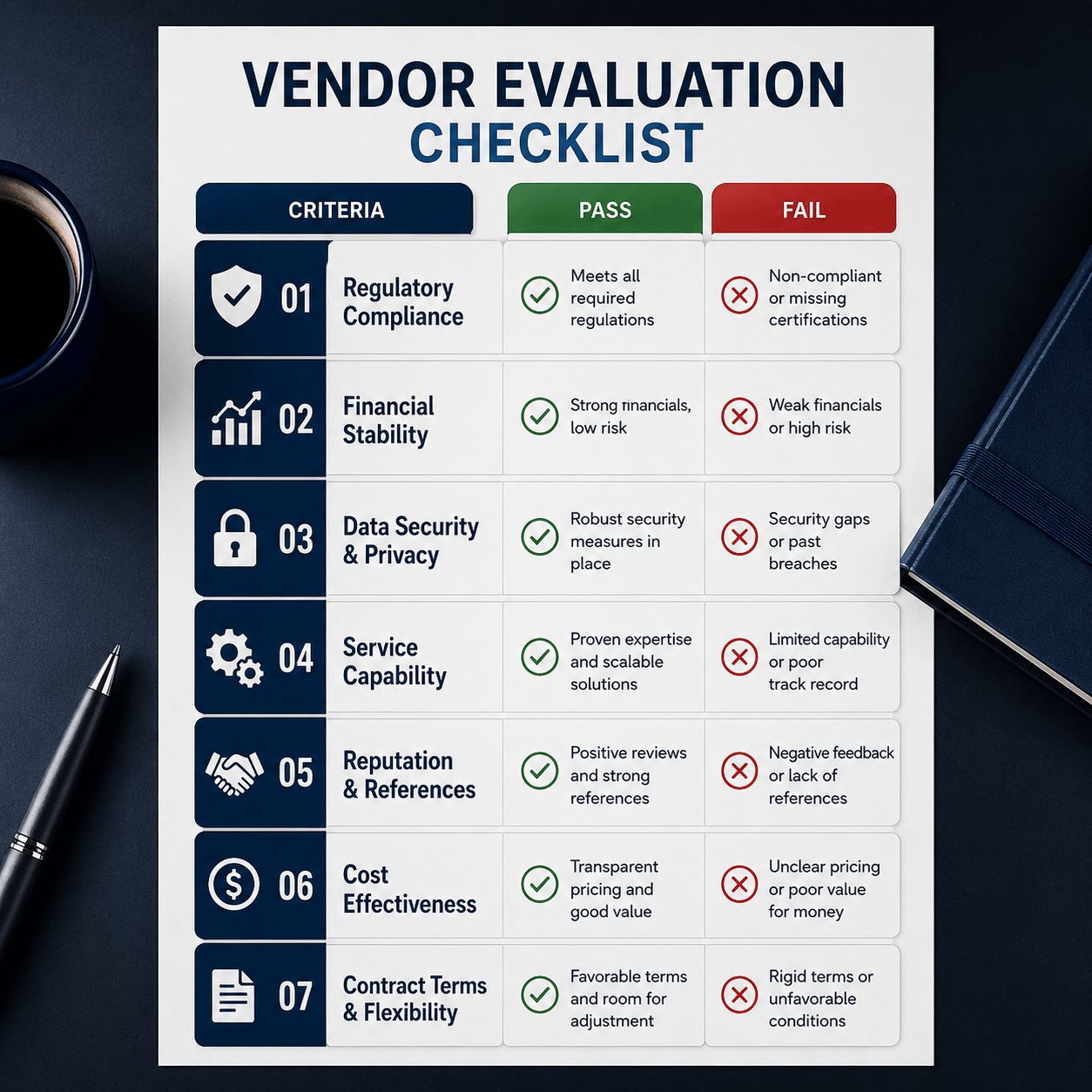
There’s no shortage of vendor comparison lists online. Most of them rank features in alphabetical order or by what’s easiest to demo. This list is different. These seven criteria come from the actual points of failure in enterprise reporting implementations, not from a product brochure.
1. Real-Time Delta Processing vs. Batch Reporting
Batch reporting is the default for most legacy enterprise report management systems delta vendors still sell. Data processes on a schedule — nightly, hourly — and your team works with whatever snapshot was captured at that point. For insurance claims, regulatory submissions, or IFRS hedge accounting cycles, that lag creates real risk.
Real-time delta processing means your reporting environment reflects data as it changes. Not every organization needs this. But if you’re managing financial instruments under IFRS 9 or running actuarial valuations with daily assumption updates, you need to know which mode your vendor actually operates in. Ask for a live demonstration using your own data structure. Not a sample dataset. Yours.
Tools like IASB hedge accounting software built on real-time delta logic look fundamentally different from batch-based alternatives when you put them side by side under load.
2. Compliance-Ready Audit Trails for Insurance Delta
The BFSI sector — banking, financial services, and insurance — accounts for 21.7% of global document management system spending, the single largest industry share. That’s not coincidence. Regulated industries generate and modify documents at a rate that demands real audit infrastructure, not bolted-on logging.
A compliance-ready audit trail for insurance delta reporting means every change to a reported figure carries a timestamp, a user ID, a reason code, and a link back to the source data. If your vendor’s demo shows you a “history” tab that lists edits without source traceability, that’s not an audit trail. That’s a changelog. There’s a difference, and your regulator knows it.
3. Document Scanning Software Delta Integration
This is the one most finance teams underestimate during selection. Document scanning software delta integration determines how physical or image-based documents — scanned policy forms, actuarial tables, signed financial statements — flow into your reporting environment and how version changes are tracked.
Poor integration here creates a split workflow: one system for structured data reporting, another for document capture, and nothing connecting the two reliably. Over time, that gap becomes a compliance liability. Ask every provider specifically how their platform handles scanned document ingestion and whether delta versioning applies to image-based inputs, not just database records.
4. API Depth and Data Pipeline Compatibility
Delta software solutions that don’t connect cleanly to your existing data stack will cost you a custom integration build. That build will take longer than quoted and break on the next vendor update.
Check three things: whether the API is REST or event-driven, whether your vendor supports webhook-based delta triggers (so downstream systems get notified only when something changes), and whether they’ve done a live integration with the ERP or data warehouse your team already runs. Not “supports integration with” — actually done it, with a reference client you can call.
Quick self-assessment before your next vendor call:
- Can you define which type of delta your team actually needs: incremental data, variance reporting, or document version tracking?
- Do you know the data pipeline your reporting tool needs to connect to — and have you given vendors that spec?
- Have you tested a vendor’s audit trail against a real scenario from your last compliance review?
If any of these is a “no,” your evaluation criteria are incomplete. Fix that before the next demo.
How Do You Evaluate Delta Software Solutions Providers?
The selection guide for enterprise report management systems delta providers isn’t a checklist you run once. It’s a process with multiple verification stages. Here’s how to structure it.
Building Your Evaluation Scorecard
Start with a weighted scoring matrix before you talk to a single vendor. Weight your criteria based on your organization’s actual risk profile, not what a generic RFP template tells you to prioritize. For a GCC-based insurer with IFRS 17 obligations, compliance audit trail depth might carry three times the weight of UI design. For a regional bank running daily IFRS 9 ECL models, real-time delta processing is your top criterion.
Here’s a practical weight distribution for most regulated finance environments:
- Delta processing capability (real-time vs. batch) — 25%
- Compliance audit trail depth and format — 20%
- API and data pipeline integration — 15%
- Document scanning delta integration — 15%
- Implementation track record in your sector — 15%
- SLA terms and escalation response time — 10%
Run two independent scorers through the same vendor demo. When they diverge, that’s where your team needs to talk. Scoring disagreements almost always point to an underspecified requirement — which means you’ve found a gap in your evaluation criteria before you’ve signed anything.
For teams evaluating valuation management software providers, this matrix applies directly, with the added layer of actuarial assumption tracking as a delta feature.
Red Flags in Delta Provider Demos
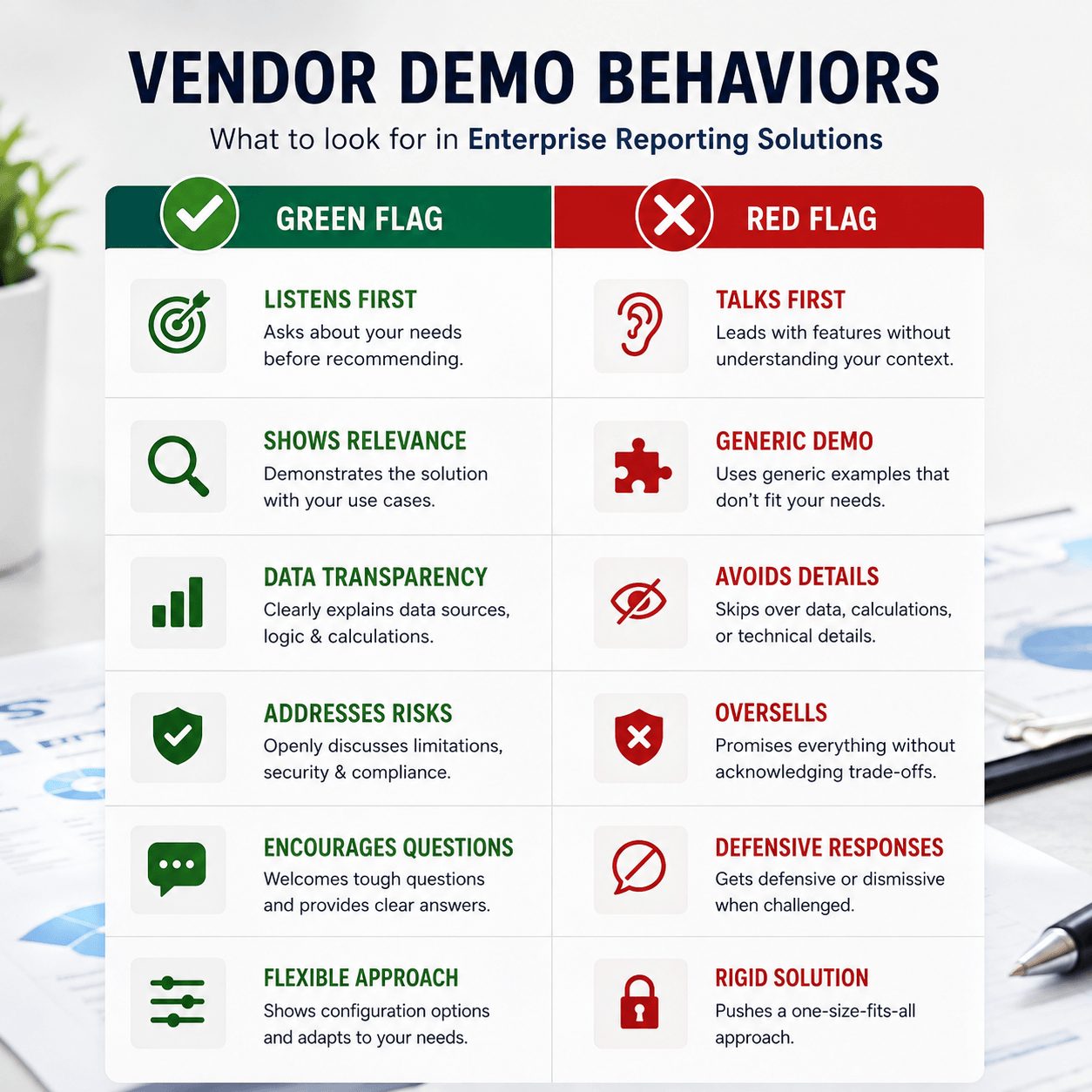
You can learn more from what a vendor avoids showing you than from what they lead with. Here are four patterns worth watching.
- The “we support it” answer without a live demo. If a vendor say
- s their platform supports real-time delta processing but pivots to a slide deck rather than showing it in your environment, that capability is either underdeveloped or unstable under load.
- Sample data only. Vendors who refuse to run a demo against your actual data structure are protecting something. Real systems perform consistently across data shapes. Canned demos don’t.
- Vague SLA language. “Best-effort” and “generally available” are not SLAs. If uptime guarantees don’t come with financial penalties and a defined escalation path, they’re aspirational, not contractual.
- One implementation reference in your sector. One client doesn’t prove the system works at scale in regulated financial environments. Ask for three, minimum, and speak to them directly. Not email. Call.
Download: Delta Provider Evaluation Scorecard Template
A pre-weighted scoring matrix built for finance and compliance teams — with delta-specific criteria for insurance, actuarial, and IFRS reporting environments.
Delta Features Insurance Report Tools Can’t Afford to Miss
Insurance is where enterprise report management systems delta capability gets tested hardest. Claims data changes constantly. Policy modifications trigger cascading updates across multiple ledgers. Regulatory filings under IFRS 17 require period-on-period variance reporting that has to trace back to individual transaction-level changes.
The global insurance document automation market reached $1.42 billion in 2024 and is projected to grow at 13.7% annually through 2033. That growth reflects one thing: insurers are replacing manual delta tracking with systems that do it automatically. The ones that haven’t are spending staff hours on reconciliation that should be automated.
Claims Variance Tracking in Real Time
Claims variance — the difference between reserved amounts and actual paid amounts — is one of the most watched metrics in insurance financial reporting. Your enterprise reporting solution needs to surface that delta at the policy level, aggregate it by line of business, and flag anomalies against historical norms without your team running a manual query.
This isn’t a nice-to-have for IFRS 17 filers. It’s how you produce the contractual service margin movements your auditor needs. If your current system produces that number through an offline spreadsheet reconciliation, you don’t have an enterprise reporting solution. You have a data export problem.
Regulatory Reporting Output Formats
Delta features in insurance report tools are only useful if the outputs meet your regulatory submission format. In the GCC, that means alignment with local IFRS adoption timelines and central bank reporting templates. Europe, Solvency II data requirements apply. Asia-Pacific, each market has its own format layer on top of IFRS.
Ask your shortlisted providers to show you a completed regulatory output file — not a template, a completed submission — from a client in your market. Then ask how delta changes between reporting periods are flagged in that output. If they can’t show you both, your compliance team will be doing that work manually after go-live.
Teams dealing with IFRS stock valuation adjustments across reporting periods will recognize exactly this problem: the IFRS stock valuation software challenge isn’t the calculation — it’s the period-on-period delta output that ties to your auditor’s expectations.
One point I’ll admit I don’t have long-run data on: how GCC-specific regulatory formats evolve after the initial IFRS 17 adoption cycle completes. The output format requirements today are based on transition guidance. Post-transition, those formats may tighten. Build that uncertainty into your contract terms now.
IFRS TECH serves enterprise clients across the GCC, Europe, and APAC running delta-intensive reporting environments. Our advisory team has worked through IFRS 17, IAS 19, and IFRS 9 implementation cycles across multiple jurisdictions. The credential matters when your vendor is making architecture decisions that affect your audit.
Decision Framework: Choosing Your Delta Provider in 6 Steps
This is the part most selection guides skip. They give you criteria but not sequence. Sequence matters because some questions disqualify vendors before you invest time on secondary criteria.
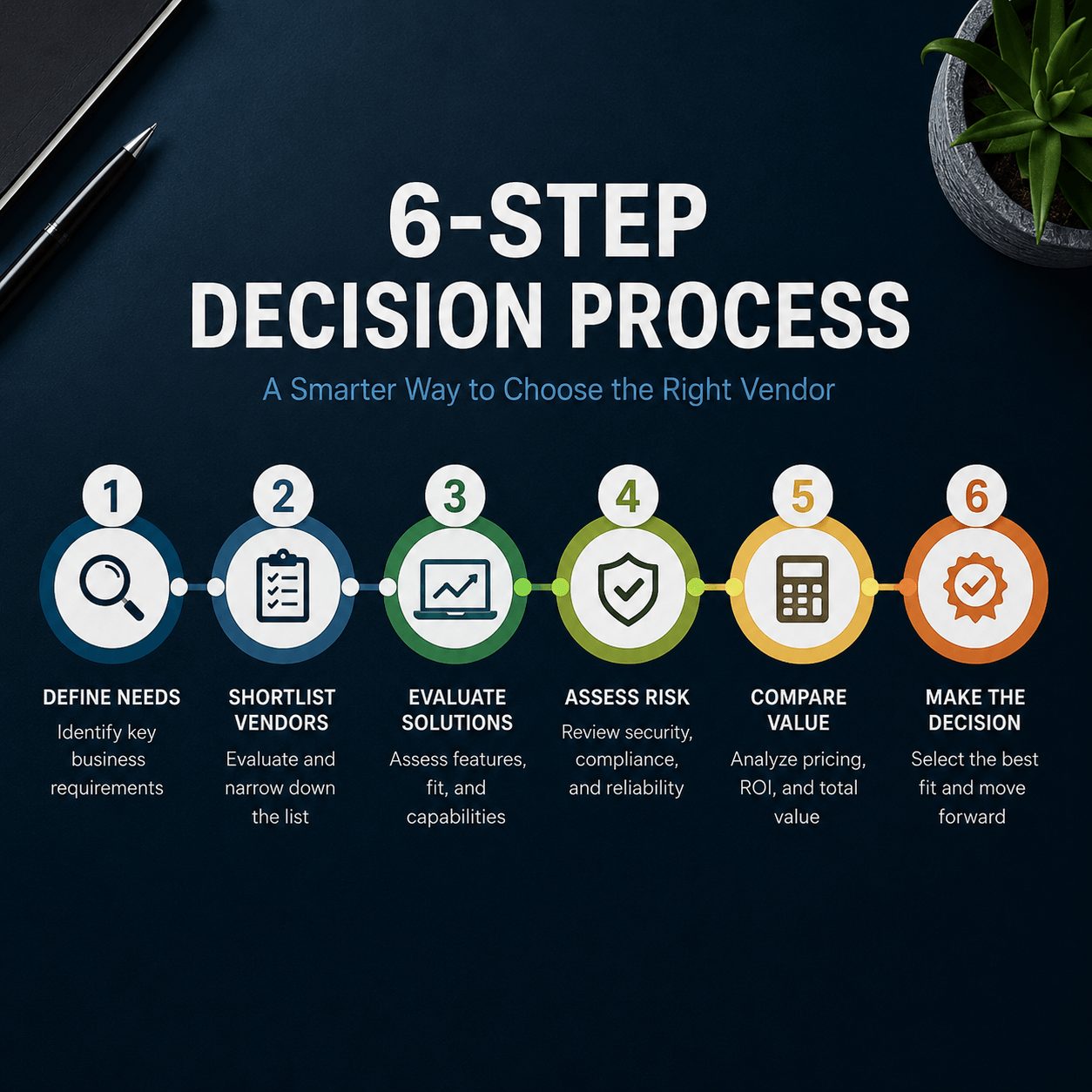
Step 1 — Define Your Delta Reporting Scope
Before you talk to anyone, write down in one paragraph what delta means for your organization’s reporting needs. Not a feature list. One paragraph. If you can’t write it clearly, your team doesn’t agree on it yet. Resolve that internally first.
Step 2 — Score Vendors Against Non-Negotiables
Run every vendor through your non-negotiable criteria before you schedule a demo. Compliance audit trail format, integration with your existing stack, regulatory output compatibility. If they fail any non-negotiable, stop. Don’t rationalize exceptions — that’s how the 19% vendor selection failure rate happens. The right approach is to move on, not negotiate on requirements that your compliance function will enforce anyway.
Step 3 — Run a Live Delta Scenario Test
Give each shortlisted vendor a real data scenario — a period close with variance, a claims run with anomalies, or a document batch with version conflicts. Ask them to process it live and show you the delta output. Time them. Watch how they handle exceptions. The test reveals more about system maturity than any RFP response.
Step 4 — Validate Compliance Outputs
Take their output files to your compliance team or external auditor before you move to contract stage. Not after. Discovering that an output format doesn’t meet your jurisdiction’s requirements at the contract review stage costs you weeks and negotiating leverage. Discover it at Step 4 and you still have options.
Step 5 — Check the Implementation Team, Not Just the Software
The gap between platform evaluation and implementation partner evaluation is why 55-75% of enterprise reporting projects miss their objectives, per Panorama Consulting’s 2024 ERP Report. The software can be excellent. The team deploying it can still fail you. Ask specifically who will run your implementation — names, not job titles — and what they’ve deployed before in your sector.
Step 6 — Negotiate SLAs with Specific Delta Metrics
Your SLA should name your delta-specific performance requirements explicitly: maximum latency for delta processing, minimum audit trail retention period, guaranteed uptime during your regulatory reporting windows. Vague SLAs protect vendors. Specific ones protect you. If a vendor resists specific language, that tells you something important about their confidence in their own system.
What Makes Enterprise Reporting Solutions Fail at Scale?
Here’s a counterintuitive point: the best-designed delta software solutions often fail not because of technical gaps but because the organization that bought them wasn’t ready to use them. And that’s something vendors will never tell you in a demo.
About 47% of organizations plan to replace or upgrade their enterprise reporting systems within 24 months. A large portion of those replacements are replacing systems that weren’t wrong for the job — they were right for a job the organization never fully defined. The delta processing worked. The audit trail worked. But nobody owned the review cycle, nobody trained the users on exception handling, and the compliance team kept doing their work in Excel because the new system’s output format didn’t match the template they’d used for five years.
That’s the whole game. Selection criteria matter, but organizational readiness determines whether what you select actually gets used. Build your readiness assessment into your selection timeline, not your post-go-live plan.
And that’s the reason the hedge accounting compliance software in finance implementations that work are the ones where the finance team, compliance team, and IT function aligned on requirements before the first vendor call — not during the implementation sprint.
IFRS TECH’s reporting advisory team has supported enterprise reporting solution selections across 40+ client engagements in the GCC, Europe, and APAC — including delta-specific implementations for IFRS 9, IFRS 17, and IAS 19 reporting cycles. See how we approach provider evaluation →
What You Now Know: 3 Things to Take Into Your Next Vendor Call
- “Delta” is not a single feature. It means incremental data processing, variance reporting, or document version tracking depending on context. Define which one your organization needs before you evaluate a single provider.
- Vendor selection errors cause 19% of enterprise software failures. A structured scorecard with non-negotiable criteria — applied before demos, not during them — cuts that risk significantly.
- The implementation team matters as much as the platform. Ask for names, check sector-specific references, and validate compliance outputs with your auditor at Step 4, not after contract signing.
Enterprise reporting solutions that handle delta features well are available. The market has grown to $394 billion in enterprise application software spend for a reason. But picking the wrong delta software solutions provider for your reporting environment is a decision that compounds: wrong output formats, missed SLAs, and audit findings that trace back to a vendor evaluation that didn’t ask the right questions.
Your next reporting cycle doesn’t have time for a re-do. Your audit doesn’t either.
See how IFRS TECH’s reporting advisory team structures delta provider evaluations for IFRS-compliant finance environments →
We’ve built and reviewed enterprise reporting solution shortlists for insurers, banks, and actuarial firms across the GCC and Europe. Our evaluation framework is available to qualifying organizations on request.
Review our valuation management software providers guidance →
FAQs: Enterprise Reporting Solutions and Delta Provider Selection
What is a delta feature in enterprise report management systems?
A delta feature tracks the difference between two data states — either incremental updates since the last sync, variance between actuals and forecasts, or version changes in document-based records. For enterprise report management systems delta capability, the feature must include a time-stamped audit trail your compliance team and external auditors can verify.
How do you evaluate delta software solutions for insurance reporting?
Start with your compliance output requirements. Ask each shortlisted delta software solutions provider to show a completed regulatory submission from a client in your jurisdiction. Then test their system against a live data scenario using claims variance or period-on-period IFRS reporting. Score providers on audit trail depth, real-time processing capability, and integration with your existing data infrastructure.
What are the red flags in a selection guide for enterprise report management systems delta providers?
Watch for vendors who present delta capability through a slide deck rather than a live demo, who only offer sample datasets rather than your real data structure, and who use vague SLA language without financial penalties. These patterns indicate the delta features are underdeveloped or unreliable under real operating conditions.
Why do enterprise reporting solutions fail to deliver delta features post-implementation?
Most failures trace back to two issues: the organization didn’t define its delta requirements precisely before selection, or the implementation team lacked sector-specific experience. The platform is often capable — but deployed against misaligned requirements by a team that hasn’t handled your regulatory environment before. Organizational readiness is the variable most selection guides ignore.
How does document scanning software delta integration affect enterprise reporting accuracy?
Document scanning software delta integration determines whether version changes in scanned documents — policy forms, actuarial tables, signed financials — are tracked and reportable alongside structured data. Without it, your delta reporting environment covers database changes but misses document-level changes. That gap becomes a compliance liability during audits that cross-reference both data types.